|
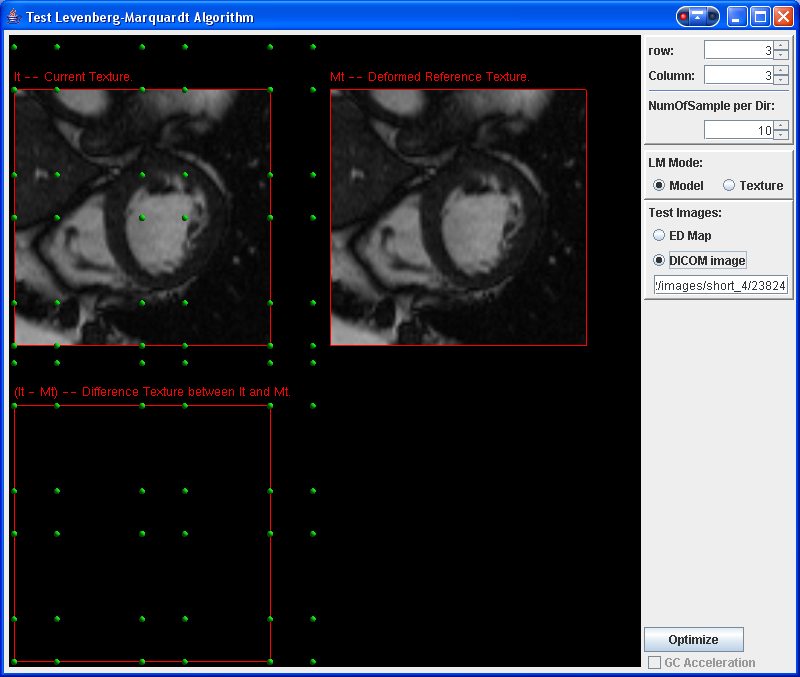
A Tool, which uses Levenberg-Marquardt Algorithm to optimize top-right model to the top-left Model.
The green dots in the top-left model are the global control points in the current FFD mode(It).
Users can drag these points to deform top-left model as wish, and then use 'Optimize' button to start
LM Algorithm to adjust top-right model. The result of LM is shown in the bottom-left canvas, which is the
difference map between the two models above, the green dots in this canvas shows the control points of
top-left model, and yellow dots show the control points of top-right model.
There are two options for the objective function of LM:
- Model: depend on the sample points of the models.
- Texture: depend on the generated model textures.
Users can test LM with either Euclidean Distance Map or their own DICOM image (either side is 256 wide).
Operational Manual:
- Left mouse button: drag control points on the top-left model.
- Middle mouse button: Move FFD model.
- Right mouse button: zoom in/out.
|